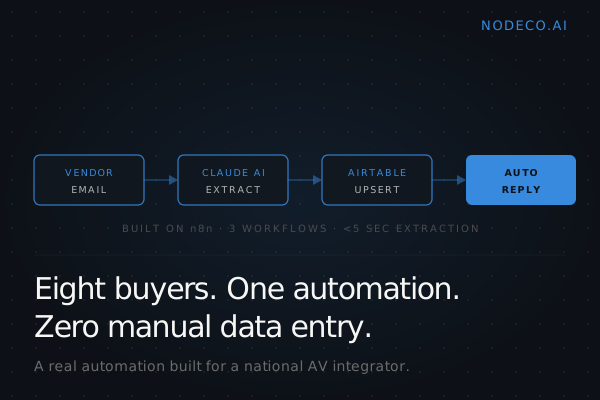
A national AV integrator had eight buyers working one-hour rotations each day reading vendor shipping notifications, extracting tracking numbers, and copying them into the ERP. Forty hours a week of human attention spent on a task a computer should handle in seconds.
The Manual Process Had Real Cost
The firm manages dozens of simultaneous projects. Hardware comes from multiple vendors, each sending shipping notifications in a different format. Some use structured HTML. Others bury the tracking number three pages into a PDF attachment.
Project coordinators read each email by hand. They extracted PO numbers, tracking numbers, ship dates, and line items. Then they re-entered that data into internal systems. Data entry errors happened. Deliveries got missed. Field teams had no way to check shipment status without asking someone to manually look it up.
When a single PO shipped in three waves with three different tracking numbers, the coordinators had to piece together which items were in transit and which were still at the warehouse. No audit trail. No searchable history. Just inboxes and spreadsheets.
The business impact showed up in delayed visibility, slow customer responses, and zero scalability. As project volume grew, the manual process didn't keep up.
What We Built
We designed a three-workflow system on n8n that handles the full shipment intelligence lifecycle.
Workflow 1: Tracking Email Intake
Gmail monitors the vendor inbox. Every new email triggers the workflow. An If node detects whether the email contains a PDF attachment and routes accordingly. Gmail's base64-encoded body gets decoded into clean text.
Claude AI extracts structured fields: vendor name, PO number, tracking numbers, carrier, ship date, ship-to address, and line items. The extracted data gets upserted into Airtable, matching on PO number and tracking number to prevent duplicates. The email is marked as read so it doesn't process twice.
This happens within five seconds of the vendor email arriving.
Workflow 2: Tracking Status Reply
Any team member can request shipment status by sending an email with subject line "TRACK [PO Number]." The system looks up all matching records in Airtable and responds automatically with a formatted HTML email.
The reply includes an AI-generated plain-language summary, a structured table showing vendor and carrier details, and clickable tracking links routed to the correct carrier. If the PO shipped in multiple waves, all records come back in a single consolidated reply.
Response time: seconds.
Workflow 3: Accuracy Feedback Loop
When someone spots an incorrectly extracted record, they check the Incorrect flag in Airtable. The system creates a correction row in a linked table, sends an email notification, and logs the delta between AI-extracted and human-corrected values.
The tech stack: n8n for orchestration, Claude Haiku for extraction, Gmail for email, Airtable for structured storage, and direct tracking link generation for FedEx, UPS, and USPS.
What Changed
100% of vendor shipping emails are now captured and structured automatically. Extraction happens in under five seconds. Tracking status requests get answered with no staff involvement. The per-email processing cost is $0 beyond existing API subscriptions.
The firm eliminated manual data entry for all vendor notifications. Shipment records appear in Airtable within seconds of the vendor email arriving. Multi-vendor support works regardless of email format or attachment type. Duplicate shipments are prevented through intelligent upsert logic.
There's now a full audit trail of every shipment linked to its source email. The database is searchable. Partial shipments are tracked across multiple records per PO. The correction feedback loop monitors AI extraction accuracy over time.
The eight buyers are working on procurement strategy now.
What This Looks Like Applied to Your Lead Follow-Up
This case study is about logistics. Your business probably isn't shipping AV hardware. But the pattern applies.
If your team is manually reading inbound emails, copying data into a CRM, and answering status requests by hand, you're running the same workflow. The vendor email is your lead form submission. The tracking number is the phone number or project ID. The "where's my shipment" request is the "did you get my quote request" email.
The questions to ask: How many hours a week does your team spend reading emails and re-entering data? What format does that data arrive in? What happens when someone asks for a status update?
If the answers are "too many," "inconsistent," and "someone looks it up manually," you're a candidate for this kind of system. The tools are the same. The workflow structure is the same. The outcome is the same: human attention moves from data entry to decision-making.
The difference between this firm and most mid-market service businesses isn't budget or technical sophistication. It's the decision to treat automation as infrastructure, not a nice-to-have.
What Happens Next
We build systems like this for growing businesses that are tired of manual processes eating staff time. The first step is a 30-minute discovery call where we map your current workflow, identify the repetitive tasks, and sketch what an automated version would look like.
No pitch. No pressure. Just a technical conversation about whether automation makes sense for your operation and what it would take to build it.
If you're curious whether your lead follow-up, client onboarding, or vendor coordination could run like this, book a call at nodeco.ai. We'll walk through your process and tell you whether we can automate it.